For the volunteer on the touchline
Less admin.
More coaching.
Plan the rotation. Run the match.
Give everyone their minutes.
Your squad, lineup, stopwatch, substitutions and parent updates — together in a simple app built for your phone.
Try the free launch preview. No account needed.
Add it to your home screen. Take it pitch-side.
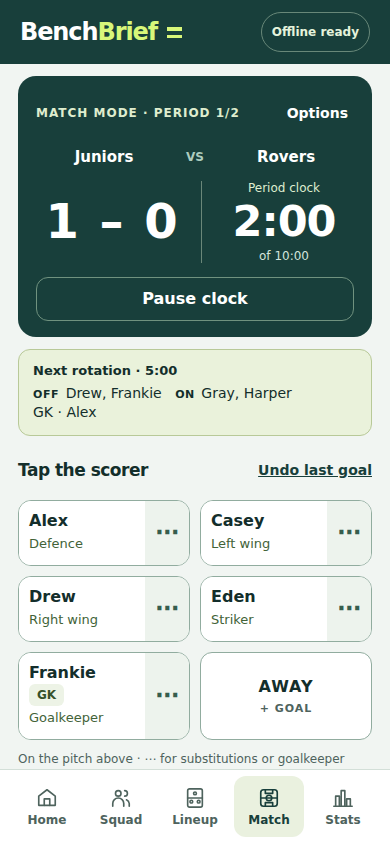
Real app screen · fictional demo players
Everyone’s minutes, sorted.
Save your squad, pick who’s available and assign your keepers. Get a fair rotation, see the minutes and share the whole plan with parents.
One hand. Eyes on the game.
Start the period. Tap the scorer. Confirm the next changes. If plans change, record a sub and rebalance the remaining time.
The report writes itself.
At full time, share a parent-ready report with the score, scorers and your own message. Keep the detailed minutes for your coaching records.
The rotation maths, made simple
See how the
minutes balance.
Try the original BenchBrief rotation engine here. Then open the app to add your own squad and take the same plan straight into Match Mode.
Whole rotations and fixed goalkeeper periods can affect equal time. The app shows the planned totals before kick-off. Follow your competition’s substitution rules.
BenchBrief Pro
A small price.
A calmer touchline.
Built for grassroots coaches who give up their Saturday, not their day job.
- Saved squad and availability, 3 to 11 a side
- Fair rotations that spread bench turns and remember past playing time
- Live timer, one-tap goals and correctable match records
- Real substitutions, late arrivals and remaining-time rebalancing
- Actual vs planned minutes, goalkeeper time and match reports
- Pitch lineups and full rotations as WhatsApp-ready images
- Parent reports, Player of the Match and matchday details
- Offline match history, season totals and coach handover
Your phone is the matchday tool. Open the app online once and wait for “Offline ready”. Add it to your home screen for a dedicated app experience.
Does it keep working without signal?
Yes, after the app has loaded online and shows “Offline ready”. Squad data, the running match and reports stay on your device. Export a backup from Home before changing phones or clearing browser data.
What if I close the app during a match?
The clock catches up from the saved start time when you reopen it. It stops at the current period’s planned end, without starting the next period. Keep the screen visible for rotation alerts; a locked phone may not vibrate.
What if I record something wrong?
Open Match Options, then Review & correct match record. Add a missed goal, change a scorer or correct a substitution time. The score, minutes and reports update together. Pause the clock before editing.
What happens after an unexpected substitution?
Record who goes off and who comes on. BenchBrief counts the actual time for each player. Rebalance adjusts future rotations using those minutes, while keeping the current players on until the next change.
Do parents need to install BenchBrief?
No. Share lineup, full-rotation, matchday and report images into your existing WhatsApp group. On supported phones, the app opens the share menu; otherwise save the images and attach them. A text version is available too.
Does it connect directly to FA Matchday?
Use Copy Match Report to transfer the score, scorers, substitutions and minutes. There’s no direct Matchday connection or league account required.
Can I install it from an app store?
This first version installs from your browser. On iPhone, open it in Safari and choose Share, then Add to Home Screen. On Android, use Chrome’s Install app or Add to Home screen option. It is not currently an App Store or Google Play listing.
Where do the players’ names go?
Squads and match data are stored locally in your browser. BenchBrief does not upload those details or include advertising or analytics scripts. You can use initials. Backups and copied reports contain the names you enter.